생활
C언어에서 실행시 문자가 움직이거나 이동시킬수 있는 방법?
C언어로 실행시켰을때 문자(예를들어 ㅁ)가 움직이거나
사용자 지정키로 움직이게 할 수 있는 헤더파일이 있습니까?
없다면 어떤 식으로 코드를 작성해야 할까요.
포인터, 연결리스트 모두 이해가능한 상태 입니다.
2개의 답변이 있어요!
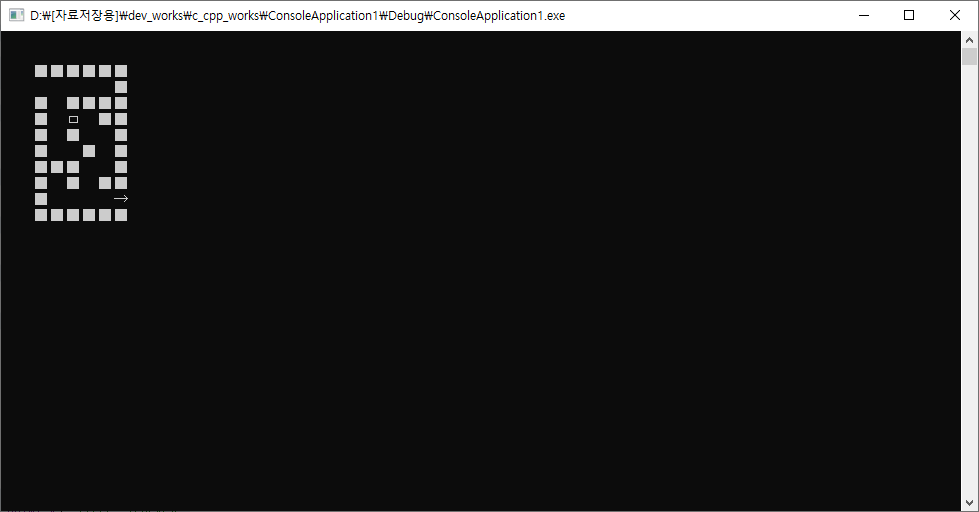
미로 찾기 소스코드에 보면 그런 소스코드가 있으니 참고하세요.
[소스코드]
#include <stdio.h>
#include <stdlib.h>
#include <windows.h>
#include <conio.h>
#define MAZEBOARDHEIGHT 10
#define MAZEBOARDWIDTH 6
#define POINT_X 4 //보드 시작좌표 x
#define POINT_Y 2 //보드 시작좌표 y
#define LEFT 75
#define RIGHT 77
#define UP 72
#define DOWN 80
#define DELAY 100
#define EXIT 50
int maze[MAZEBOARDHEIGHT][MAZEBOARDWIDTH] = {
{ '1','1','1','1','1','1' },
{ 'e','0','0','0','0','1' },
{ '1','0','1','1','1','1' },
{ '1','0','0','0','1','1' },
{ '1','0','1','0','0','1' },
{ '1','0','0','1','0','1' },
{ '1','1','1','0','0','1' },
{ '1','0','1','0','1','1' },
{ '1','0','0','0','0','x' },
{ '1','1','1','1','1','1' }
};
void setCursor(int x, int y)
{
COORD pos;
pos.X = x;
pos.Y = y;
SetConsoleCursorPosition(GetStdHandle(STDOUTPUTHANDLE), pos);
}
COORD getCursor(void)
{
COORD curPoint;
CONSOLESCREENBUFFER_INFO pos;
GetConsoleScreenBufferInfo(GetStdHandle(STDOUTPUTHANDLE), &pos);
curPoint.X = pos.dwCursorPosition.X;
curPoint.Y = pos.dwCursorPosition.Y;
return curPoint;
}
void removeCursor(void)
{
CONSOLECURSORINFO cur;
GetConsoleCursorInfo(GetStdHandle(STDOUTPUTHANDLE), &cur);
cur.bVisible = 0;
SetConsoleCursorInfo(GetStdHandle(STDOUTPUTHANDLE), &cur);
}
void showBoard(void)
{
int x, y;
COORD cur = getCursor();
for (y = 0; y<MAZEBOARDHEIGHT; y++)
{
for (x = 0; x<MAZEBOARDWIDTH; x++)
{
setCursor(cur.X + (x * 2), cur.Y + y);
if (maze[y][x] == '1')
printf("■");
if (maze[y][x] == 'x')
printf("→");
}
}
setCursor(cur.X, cur.Y);
}
void showCharacter(void)
{
COORD cur = getCursor();
printf("ㅁ"); //◎ 2021.06.01 수정
setCursor(cur.X, cur.Y);
}
int detect(int x, int y)
{
int x1 = 0;
int y1 = 0;
// 커서 위치 얻기
COORD cur = getCursor();
// 미로내에서의 위치 계산.
x1 = cur.X + x;
y1 = cur.Y + y;
x1 = x1 / 2 - 2;
y1 = y1 - 2;
// 미로 밖에 있느냐?
if (!((x1 >= 0 && x1 <MAZEBOARDWIDTH) && (y1 >= 0 && y1 <MAZEBOARDHEIGHT)))
{
return 1;
}
//배열을 넘어가지 않는이유?
if (maze[y1][x1] == '1')
return 1;
//미션성공
else if (maze[y1][x1] == 'x')
return EXIT;
else
return 0;
}
void RemoveCharacter_Set(int x, int y)
{
int value = detect(x, y);
if (value == 0)
{
COORD cur = getCursor();
printf(" ");
setCursor(cur.X + x, cur.Y + y);
}
else if (value == EXIT)
{
setCursor(10, 15);
printf("성공!");
system("pause");
exit(1);
}
}
void character_static(void)
{
int kb;
setCursor(4, 3); //케릭터 시작위치
while (1)
{
while (!_kbhit())
{
showCharacter();
Sleep(DELAY);
}
kb = _getch();
switch (kb)
{
case UP:
RemoveCharacter_Set(0, -1);
break;
case DOWN:
RemoveCharacter_Set(0, 1);
break;
case RIGHT:
RemoveCharacter_Set(2, 0);
break;
case LEFT:
RemoveCharacter_Set(-2, 0);
break;
}
}
}
int main()
{
removeCursor(); //커서 깜박이 지우기
setCursor(POINTX, POINTY); //보드 시작좌표
showBoard(); //미로판 보여주기
character_static(); //케릭터 움직이기
getchar();
}
[실행결과 캡쳐]